What is n8n Automation? Visual Workflows for AI and Business Efficiency
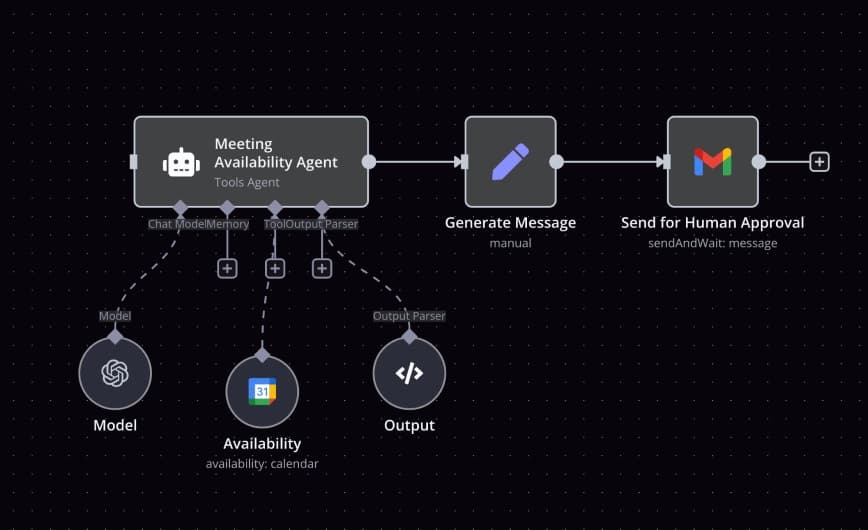
n8n (pronounced “en-eight-en”) is a flexible workflow automation platform that allows users to connect applications, APIs, and data systems using a visual node-based editor. It bridges the gap between no-code and low-code automation—giving both developers and non-technical users the power to create intelligent, repeatable processes.
1. Overview: Why n8n Matters
Unlike closed systems such as Zapier or Make, n8n is source-available and can be self-hosted. That means companies retain full control over their data while automating everything from CRM updates to AI-powered tasks. It combines API integration, custom scripting, and conditional logic into a single workflow canvas.
At its core, n8n lets you design data-driven automations that link cloud services, databases, and AI models to remove manual work and ensure consistency across systems.
2. Core Features
Visual Workflow Builder
Drag-and-drop nodes to design automations that move data between apps. Each node performs a function—fetching, transforming, or sending data.
500+ Integrations
Supports popular platforms like Gmail, Slack, Notion, HubSpot, Google Sheets, and custom HTTP requests.
Custom Code Nodes
Add JavaScript or Python logic when needed. n8n is hybrid: visual when you want simplicity, code-based when you need precision.
Self-Hosting
Deploy n8n on your own infrastructure (Docker, VPS, or Kubernetes) for full security and privacy control.
Error Handling and Retries
In-built error logic ensures failed executions retry automatically or route through backup branches.
Queue Mode for Scale
Large workflows can be distributed to worker processes for high performance automation.
3. How n8n Works
An n8n workflow has three main components:
- Trigger Node – Starts the process (webhook, API event, or schedule).
- Action Nodes – Perform tasks such as reading files, sending emails, or making API calls.
- Logic Nodes – Control flow with conditions, loops, or parallel paths.
Each node passes structured JSON data to the next, allowing complex pipelines to run without manual intervention.
4. Business Use Cases
a. Social Media Automation
Goal: Post content automatically across multiple platforms.
Workflow Example:
- Trigger: Scheduled time (daily at 9 AM)
- Actions:
- Retrieve content from Google Sheets or CMS
- Format captions and hashtags
- Post to Twitter, LinkedIn, and Instagram APIs
- Notify team via Slack
This replaces repetitive cross-posting and maintains consistency across channels.
b. Data Synchronization Between Systems
Goal: Keep CRM and Google Sheets synchronized.
Workflow Example:
- Trigger: New row added in Google Sheets
- Transform data (clean fields, add tags)
- Insert or update contact in HubSpot
- Send Slack update confirming success
Ensures your sales or marketing data remains accurate across tools.
c. E-Commerce Order Automation
Goal: Auto-generate invoices and send supplier notifications.
Workflow Example:
- Trigger: New order in Shopify
- Fetch order details
- Generate invoice PDF
- Email invoice to customer
- Check inventory and reorder from supplier if stock < 10
Reduces manual data entry and accelerates order fulfillment.
d. IT and DevOps Alerts
Goal: Monitor system uptime and send alerts.
Workflow Example:
- Trigger: Scheduled health check
- HTTP node pings service
- If response time > threshold, send alert to Slack
- Create issue in Jira or Notion for follow-up
Combines monitoring, ticketing, and communication into one automated loop.
e. AI-Powered Workflow Example
Goal: Summarize uploaded documents using AI.
Workflow Example:
- Trigger: New document uploaded to Google Drive
- Download file
- Send content to an AI model (e.g., OpenAI GPT or Gemini)
- Generate summary
- Email summary to team and save to Notion
This merges n8n’s automation with generative AI capabilities, saving hours of manual review.
5. Integration with MY AI TASK
MY AI TASK enhances n8n workflows with AI automation layers that optimize business operations.
Examples include:
- Automatically generating social media videos using Google Veo 3 after content approval.
- Integrating AI chatbots that reply to customer messages in Slack or email.
- Auto-tagging CRM leads with AI-driven sentiment analysis.
Through MY AI TASK, businesses can design fully automated pipelines that connect human creativity with AI precision—turning hours of manual labor into minutes of AI execution.
6. Advantages and Challenges
Advantages
- Visual and intuitive interface
- Hundreds of built-in connectors
- Self-hosted for full data ownership
- Extendable with custom code or AI APIs
- Scalable for enterprise workloads
Challenges
- Slight learning curve for complex logic
- Requires hosting setup for self-managed users
- Some license restrictions under “Fair-Code” model
- High-volume workflows need queue configuration
7. Example Workflow: Automated Lead Follow-Up
Scenario: A new customer submits a contact form.
Workflow:
- Trigger: Webhook from website form
- Node: Enrich lead info using Clearbit API
- Node: Add contact to CRM (HubSpot or Salesforce)
- Node: Send personalized email reply
- Node: Log data in Google Sheets
- Node: Notify sales team via Slack
This end-to-end automation ensures leads are captured, responded to, and tracke
Through MY AI TASK, businesses can design fully automated pipelines that connect human creativity with AI precision—turning hours of manual labor into minutes of AI execution.